Agenda, Day, Week, Month, Year
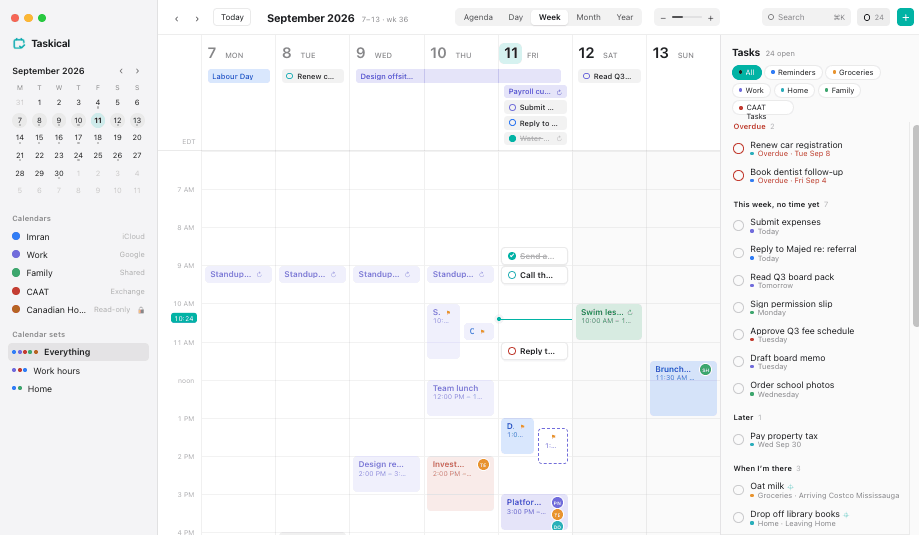
Scroll between weeks and months instead of clicking arrows. Pinch the hour height to fit your day. Overlapping meetings share the column instead of hiding each other.
Taskical shows Apple Calendar and Reminders together and lets you drag a task straight onto the day. Your events and reminders stay with your existing macOS accounts. Taskical reads and updates them with your permission, without a separate calendar-content database or server mirror.
Events stay in your calendar accounts and tasks stay in Reminders. No separate Taskical calendar-content database.
Siri, Shortcuts, widgets, your Watch, shared family lists. Same data, better view.
Give a reminder a time by putting it where it belongs. It syncs back in a second.
Review invitation changes before sending them directly through Google, Microsoft or iCloud.
One field, from anywhere, with ⌥Space. Taskical shows exactly what it will create, where it will land, and who gets invited, before you press return. No surprises in your calendar.
Scroll between weeks and months instead of clicking arrows. Pinch the hour height to fit your day. Overlapping meetings share the column instead of hiding each other.
Reminders that still need a slot wait on the right: overdue, this week, later, unscheduled. Once you drop one onto the grid it leaves the queue.
Work hours, Home, Everything. One click switches what you see. Let a Focus switch it for you.
“When I get to Costco” becomes an arriving alert that Reminders and your iPhone fire. Taskical never tracks you.
Every move, reschedule and delete shows a small toast with Undo. ⌘Z works too. Drag with confidence.
Follows the system appearance. Four UI sizes so the whole window grows without breaking the layout.
iCloud, Google and Exchange calendars. Reminders lists, including shared ones and Exchange tasks. Light and dark, at whatever size your eyes prefer.
Free to download on the Mac App Store. Start the trial by choosing the zero-price trial purchase. After 14 days, choose the permanent unlock if you want to keep using Taskical. No subscription and no automatic charge.
macOS 26 or later · Intel and Apple silicon. Purchase informationThe words Taskical understands. Everything else is the title.
Short, dated, no marketing. The app reads this same list for its What’s New sheet.
Taskical’s use and transfer of information received from Google APIs will adhere to the Google API Services User Data Policy and, for Google Workspace data, the Google Workspace API User Data and Developer Policy, including the Limited Use requirements.
Google API data is used to provide the features you authorize: reviewed Google calendar invitation changes and replies in the Mac app, administrator sign-in, and the website owner’s Analytics connection and reports. Native calendar operations communicate directly with Google; Taskical’s website does not receive a server-side copy of your Google calendar. Native Google credentials stay in your Mac’s Keychain. Content you choose to send for support is handled as described below.
We will not sell Google API data, use it for advertising or credit decisions, or use it to train general-purpose AI or machine-learning models. Transfers are limited to delivering the authorized features with your consent, security needs or legal requirements. Human access to Google API data is limited to specific data you agree to share, necessary security or legal handling, or aggregated and anonymized information for internal operations. These limits also apply to people working on Taskical’s behalf.
Taskical is developed by Imran Mughal. The native-app practices above are separate from this website. Feedback sent from the website or app is retained in a private review queue, including your message, supplied email, app version, optional diagnostics and our notes and replies. Approved collaborators can review feedback and organize future work. If you supply an email address, our email provider processes replies sent to you.
Screenshots are not accepted by the feedback API. Screenshots you review and send through your email app are received in the support mailbox with your email message and sender details, and may contain calendar or other personal information.
We count website page requests by day, page and broad device category. These aggregate counts include automated traffic and contain no IP address or visitor identifier. The server and HTTPS proxy process connection information such as your IP address and request headers. Feedback rate limiting uses an IP-derived hash held temporarily in memory. Routine proxy access logging is disabled, but technical error logs can retain client IP addresses and request details when errors occur.
Google Analytics loads automatically on public website pages. Google receives usage and device information and uses analytics cookies to measure visits. We configure clean page addresses without query strings and do not include feedback text or email addresses in analytics events. The feedback page and admin workspace do not load Analytics. Website analytics does not enable tracking in the native Mac app.
Administrator sign-in uses Google and Better Auth. We store the administrator’s name, verified email, Google profile-image URL when supplied, account identifiers, approval status and session records, which can include IP address and browser user-agent information. Essential cookies maintain sign-in. Only the owner can approve or revoke workspace access. Google integration tokens are encrypted at rest.
Separately from public website analytics, the owner can authorize Analytics read and edit access in the admin workspace. Taskical reads accessible Analytics account, property and web-stream names and identifiers to find or create the website’s connection. At the owner’s request it can create a property and web stream, or connect an existing stream, and turn off enhanced automatic measurement. This authorization does not give the website access to native users’ calendars or Gmail messages.
We retain the connected account, property, stream and measurement identifiers in the server database. The server requests aggregate users, sessions, page views, engagement, daily counts and traffic-channel reports from Google, and caches the results in server memory until they are replaced or the server process stops. Approved collaborators can view these reports in the dashboard; only the owner can manage the connection. Visitor page views are configured without Google Signals or advertising-personalization signals, and no native feedback content is added to these reports.
You can revoke Taskical’s Google authorization through your Google Account connections. Revoking authorization prevents further authorized API access; it does not automatically erase data already retained by Taskical or Google. Contact us below to request deletion of Taskical’s retained records.
Feedback, replies and support email are retained for support and planning; they do not expire automatically. Closing a feedback item changes its status and does not delete it. Server backups may also retain copies. There is no self-service deletion control. To request deletion of your feedback or account data, use our feedback form, choose Question, and include your feedback reference if you have one. We review requests manually, including the records and backup copies involved.
This goes straight into the backlog, same as the in-app sheet. Supply an email address if you would like a reply.